Discord relative timestamp: is it a live clock?
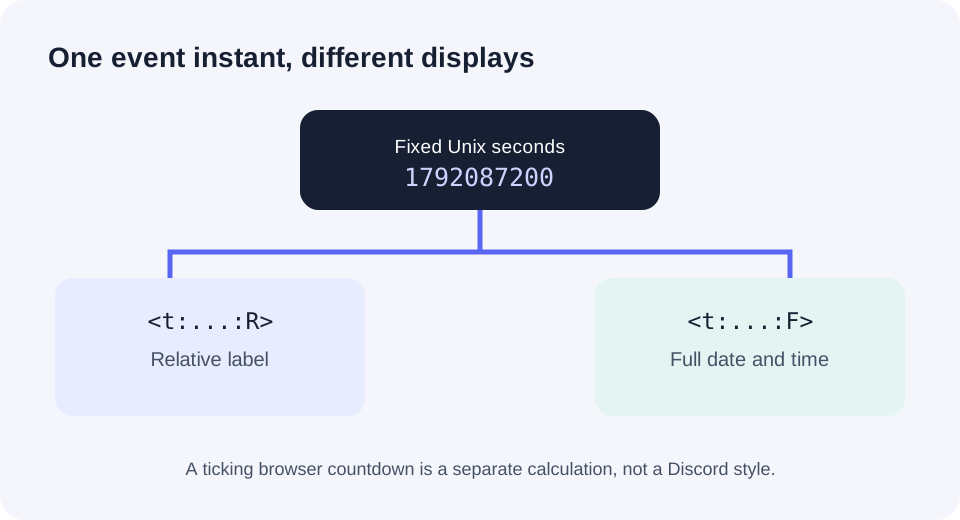
Answer: Use <t:UNIX_SECONDS:R> to ask Discord for a relative label, such as time until or since one fixed instant. The R style does not specify a ticking hours:minutes:seconds clock or a refresh interval. If people also need the exact scheduled date and time, put the same seconds in <t:UNIX_SECONDS:F> beside it.
A community question supplied by the site owner asks how to make a message with a “live(ish) clock.” The useful distinction is between a relative label and a second-by-second countdown. A user also guessed that a script might be needed; the documented R style needs only timestamp markup for the relative label. A custom ticking display is a separate application.
Try one event without changing its instant
The input uses your device's local timezone. Check that timezone before copying for a real event.
Choose a dateChoose a dateThis counter is our browser's arithmetic demo. It updates on this page once per second. It is not a capture of Discord or evidence of Discord's refresh rate or exact wording. Test the pasted codes in your own Discord client.
What stays fixed while the relative answer changes?
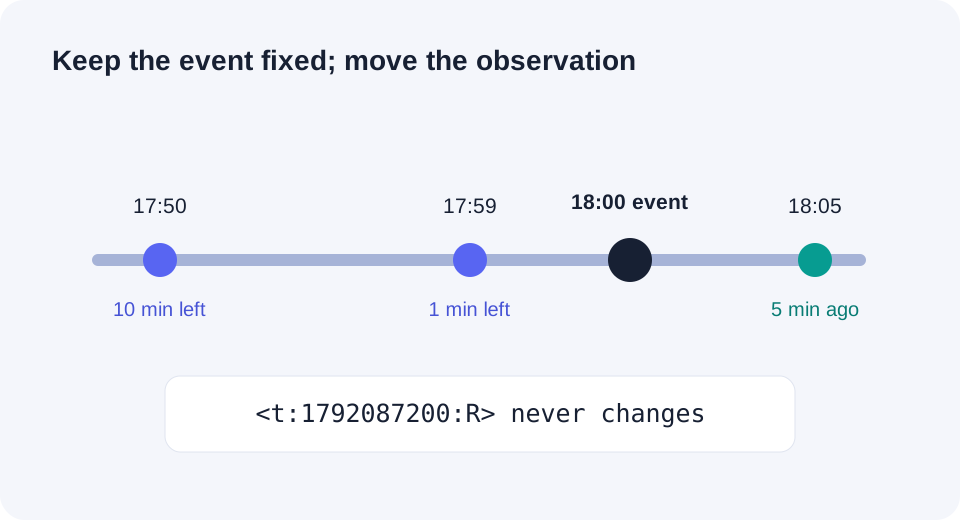
For a reproducible example, set the event to 2026-10-15T18:00:00Z. JavaScript's Date.parse('2026-10-15T18:00:00Z') / 1000 gives 1792087200, so the relative markup is <t:1792087200:R>. Each row below subtracts an observation instant from that same event instant. These are exact interval calculations, not promised Discord labels.
| Observation in UTC | Event minus observation | Interpretation |
|---|---|---|
| 17:50 | +600 seconds | 10 minutes until the event |
| 17:59 | +60 seconds | 1 minute until the event |
| 18:05 | −300 seconds | 5 minutes since the event |
Which code belongs in an event announcement?
If the question is “how long until it starts?”, use R. If the question is “what date and local time is it?”, use F. For an international event where the calendar day matters, put both styles in the same message with the same Unix-second value. Swapping only the final letter cannot repair a timestamp made from the wrong date or timezone; our cross-date check explains that separate problem.
Does R make a message's clock move every second?
No such cadence is promised by Discord's documented timestamp styles. That reference names R “Relative Time” and shows a relative example; it does not define a seconds-ticking clock. The blue counter above is deliberately separate browser code. For an exact on-screen countdown, build and test that display in the application that will show it rather than assuming Discord's message renderer supplies one.
Sources and method
Discord's official formatting reference supplies the timestamp syntax, Unix-second unit, viewer-local display rule, and R/F style descriptions. The live-looking-clock question came from a user-supplied r/discordapp discussion lead; its exact thread content was not independently retrieved here. The three interval rows, browser counter, and diagrams were made for this page. They do not measure Discord's update behavior.